
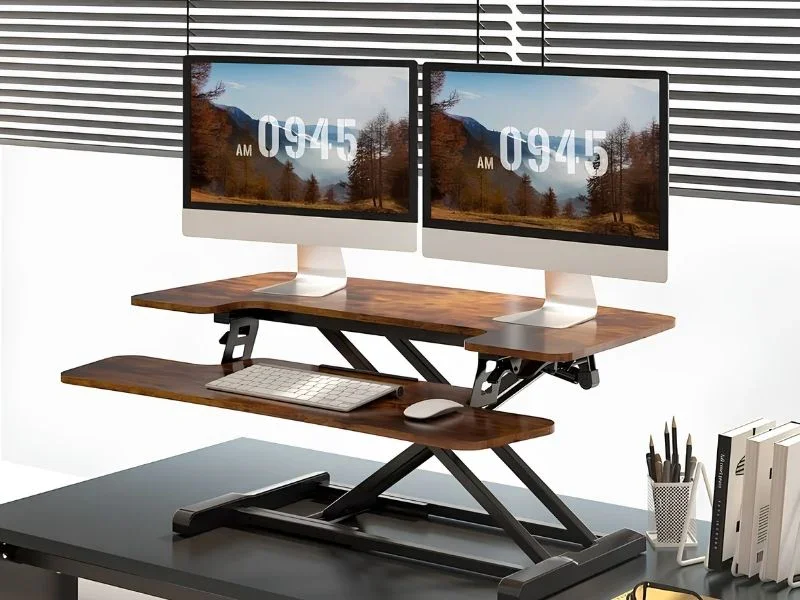
When I first look at the phrase “riser desk,” I think about a simple idea: raising a computer workspace to a more useful height. A riser desk, commonly called a desk riser or desktop standing desk converter, is a platform that sits on top of an existing desk and allows a monitor, keyboard, laptop, or other equipment to be positioned higher. Depending on the design, I can use it while sitting, standing, or switching between the two.
I believe the most important distinction is that a riser desk does not necessarily replace the existing desk. Instead, it modifies the working height of the surface already available. This makes the concept particularly useful for people who want to experiment with standing work without immediately replacing an entire desk.
From my perspective, the growing interest in riser desks makes sense because workstation height has a direct relationship with posture and comfort. Occupational Safety and Health Administration guidance emphasizes that a properly designed desk should provide sufficient space, accommodate computer equipment appropriately, and support different working postures.
We should also avoid treating a riser desk as a magical solution to every problem caused by desk work. Raising a monitor can improve its position while leaving the keyboard, mouse, chair, feet, and other parts of the workstation poorly arranged. I therefore see a riser desk as one component of an ergonomic workstation rather than a complete ergonomic system.
Key Takeaways About Riser Desks
A riser desk is essentially a height-raising workstation accessory that allows me to elevate my computer equipment above the original desktop. Some models are manually adjustable, while others use springs, pneumatic mechanisms, electric motors, or other mechanisms to change height.
The main practical advantage is flexibility. Instead of being restricted to one working position, I can potentially move between sitting and standing without replacing my existing desk. That flexibility can be particularly useful when I spend many hours performing computer-based tasks.
A riser desk can also help address the low screen position that commonly occurs with laptops. Mayo Clinic recommends considering an external keyboard and mouse with a laptop stand because a laptop’s screen and keyboard are attached, making it difficult to position both at ideal heights simultaneously.
I would summarize the most important points this way:
- A riser desk sits on an existing desk or work surface.
- It raises equipment to a higher working position.
- Many models support sitting and standing positions.
- Some are designed primarily for monitors, while others support complete keyboard-and-monitor setups.
- A good riser should be stable and appropriate for the equipment being placed on it.
- Proper monitor, keyboard, mouse, and body positioning still matters.
- A riser desk is not necessarily the same thing as a complete height-adjustable standing desk.
- Switching positions and moving regularly can be more useful than simply standing continuously.
- The correct choice depends on available desk space, equipment weight, working habits, and adjustment needs.
In my analysis, the biggest benefit is not simply “standing.” It is the ability to make the workstation more adaptable.
What Is a Riser Desk? Definition and Context
When someone asks, “What is a riser desk?”, I would define it as an adjustable or elevated platform designed to raise a computer workstation above the surface of a conventional desk.
The term can refer to several different products. Some risers are compact platforms designed to elevate a laptop or monitor. Others have a larger upper platform and a separate lower platform for a keyboard and mouse. More advanced models can move the entire working surface vertically.
This variety explains why two products described as riser desks can look completely different.
A basic monitor riser might simply place a screen several inches higher. A full desktop converter, by contrast, may support a monitor, keyboard, mouse, and other accessories while allowing the entire arrangement to move between sitting and standing heights.
The underlying purpose remains similar: change the vertical relationship between the worker and the equipment.
OSHA’s workstation guidance explains that desk surfaces that are too high or too low can contribute to awkward postures, including extended arms and raised shoulders. It also recommends that desks accommodate a variety of working postures.
That point is important because I do not think the goal should be to find one universally perfect desk height. Human body dimensions differ, equipment differs, and tasks differ. A height that feels comfortable for one person may be unsuitable for another.
Riser Desk Versus a Standing Desk
A riser desk and a traditional standing desk solve a similar problem in different ways.
A conventional standing desk is itself the primary work surface. Its legs or frame raise and lower the desktop, depending on the model. A riser desk instead sits on an existing work surface.
This difference affects cost, space, installation, portability, and flexibility.
For example, imagine a person who already owns a sturdy desk and wants to try alternating between sitting and standing. Replacing the entire desk could be unnecessary. A riser could provide a smaller intervention.
On the other hand, someone who needs a large work surface, several monitors, heavy equipment, or extensive under-desk space might find a full sit-stand desk more practical.
I believe the right choice depends less on which product is fashionable and more on what the workstation actually needs to accomplish.
How a Riser Desk Works
The basic mechanism is straightforward. I place the riser on an existing desk and put my equipment on the elevated platform. When I want to sit, I lower the platform or use a lower setting. When I want to stand, I raise it.
Different products accomplish this movement in different ways.
Manual risers generally require me to adjust the platform using a handle, lever, locking mechanism, or another manual control. They can be relatively simple because they do not require an electric motor.
Spring-assisted and pneumatic designs use mechanical assistance to make height changes easier. Electric models use motors and controls to move the platform vertically.
The exact mechanism is less important to me than whether it provides stable, predictable adjustment.
A riser can also have different platform arrangements. A single flat platform may be sufficient for a laptop. A two-level arrangement can separate the monitor from the keyboard. Some models provide dedicated areas for monitors and input devices.
The design becomes particularly important when I use a desktop computer with a separate keyboard and mouse. Raising only the monitor does not automatically raise the keyboard. If the keyboard remains too low or too high relative to my body, the workstation can still be uncomfortable.
Mayo Clinic recommends positioning the keyboard so the wrists and forearms remain aligned and the shoulders stay relaxed. It also recommends keeping the monitor directly in front of the user, around arm’s length away, with the top of the screen at or slightly below eye level.
This gives us a useful principle: a riser should be adjusted around the whole workstation, not around one piece of equipment.
Main Types of Riser Desks
I find it easier to understand the market by dividing riser desks according to how they move and what they are designed to support.
Fixed Riser Platforms
A fixed riser is the simplest type. It elevates equipment to one predetermined height.
This can be useful when the main objective is raising a monitor or laptop rather than repeatedly changing between sitting and standing.
For example, someone might have a laptop whose screen sits too low on a desk. A fixed platform could raise the laptop while an external keyboard and mouse remain on the original desk surface.
The limitation is obvious: the height cannot normally be adjusted during the day.
Manual Adjustable Riser Desks
Manual adjustable models provide several height positions without requiring an electric motor.
I consider this category useful for people who want adjustability without adding electrical components. The trade-off is that changing positions may require physical effort.
For occasional adjustments, that may not matter. If I expect to change position frequently, ease of adjustment becomes more important.
Spring-Assisted or Pneumatic Risers
These models use mechanical assistance to make the platform easier to raise and lower.
The advantage is convenience. Instead of lifting the full weight of the workstation directly, the mechanism assists the movement.
The important consideration is whether the mechanism can handle the equipment load safely and smoothly. I would always compare the manufacturer’s stated capacity with the actual weight of monitors, laptops, stands, speakers, and other items placed on the platform.
Electric Riser Desks
Electric risers use motors to change height, generally through buttons or controls.
I see this as the convenience-oriented option. If I regularly switch between sitting and standing, motorized adjustment can reduce the effort required.
However, the presence of a motor does not automatically make a riser better. It may add cost, electrical requirements, weight, and another mechanical component. The value depends on how frequently the adjustment feature will actually be used.
Portable Laptop Risers
Portable risers are designed primarily for laptops and smaller devices.
These can be useful in flexible work environments because they are easier to move between locations. Their compact size can also make them appropriate for smaller desks.
The limitation is usually load capacity and workspace area. A portable laptop riser is not necessarily suitable for a large monitor, keyboard, mouse, documents, and accessories.
Why People Use Riser Desks
The strongest reason to use a riser desk is usually workstation flexibility.
If I work at a desk for several hours, remaining in one position for the entire period can become uncomfortable. Mayo Clinic recommends getting up and moving regularly and notes that some work can be performed while standing.
A riser can make that transition easier.
Another reason is laptop ergonomics. Laptop screens tend to be low when the device is placed directly on a desk. Raising the screen can make it easier to position the display appropriately, although I would normally pair the elevated laptop with an external keyboard and mouse if I need to type for extended periods.
A third reason is adaptability. A fixed desk may be comfortable for one task but unsuitable for another. A riser can introduce another working height without requiring a complete furniture change.
There is also a space consideration. Someone living or working in a smaller room may not want to replace an existing desk with a large height-adjustable frame.
I would therefore describe the riser as a modification rather than simply another type of desk.
Ergonomic Benefits and Limitations of a Riser Desk
It is tempting to say that a riser desk automatically improves ergonomics. I would be more careful.
A well-adjusted riser can help me place a monitor at a more appropriate viewing height. It can also allow me to alternate between sitting and standing. Those are meaningful advantages.
However, standing for long periods is not automatically better than sitting. NIOSH notes that standing computer workstations have become popular but that prolonged standing also has associated health concerns.
That is why I believe the strongest approach is variation.
Mayo Clinic similarly advises taking breaks from standing and paying attention to posture when using a standing desk. In one Mayo Clinic segment, wellness exercise specialist Nolan Peterson said:
“I wouldn’t recommend typically going from just sitting to standing all day long.”
Nolan Peterson, Mayo Clinic Healthy Living Program
The quotation matters because it challenges an overly simplistic idea: more standing is not necessarily the objective. The objective is a more flexible working pattern.
We can think of the riser as a tool for changing position rather than a command to stand continuously.
Monitor Position
Monitor placement is one of the most important parts of the setup.
Mayo Clinic recommends positioning a monitor directly in front of the user and about an arm’s length away, with the top of the screen at or slightly below eye level.
If I raise the monitor too much, I may create another posture problem. If I leave it too low, I may continue looking downward.
A riser should therefore be adjusted according to the person, chair, monitor, and task.
Keyboard and Mouse Position
The keyboard and mouse deserve equal attention.
If the monitor is raised but the keyboard remains awkwardly positioned, the workstation may still produce shoulder, wrist, or arm discomfort.
OSHA recommends avoiding desk heights that force awkward arm positions and raised shoulders.
For me, this means the riser should be viewed as part of a connected system: screen height, input-device height, chair height, and body position all interact.
Feet and Lower-Body Position
Standing introduces another consideration: the feet.
Mayo Clinic’s standing-desk guidance recommends paying attention to comfort and mentions supportive footwear and an anti-fatigue mat as possible considerations.
I would not interpret that as meaning everyone needs a specialized mat. Instead, it reinforces the broader point that standing changes the demands placed on the body.
If standing becomes uncomfortable, changing position, sitting down, walking briefly, or taking a break may be more sensible than forcing myself to remain upright.
Practical Examples of Riser Desk Use
The following examples are hypothetical scenarios rather than personal experiences or verified case studies.
Example 1: Laptop User With a Low Screen
Suppose I work from a laptop for several hours each day. The keyboard is comfortable because it is already at desk height, but the screen sits low enough that I frequently look downward.
One possible solution is to place the laptop on a riser and connect an external keyboard and mouse.
Now I can position the screen higher without forcing the keyboard to rise with it. This gives me more control over the relationship between the display and my hands.
Example 2: Dual-Monitor Workstation
Imagine a worker using two monitors, a keyboard, and a mouse.
A small laptop stand may not be enough. A larger desktop riser could potentially support the monitor arrangement while providing enough space for the keyboard.
The important question is not simply whether the riser can physically hold the equipment. I also need to consider stability, available surface area, cable movement, and the height range.
Example 3: Alternating Sitting and Standing
Consider someone who already has a comfortable office chair and desk but wants to introduce standing into the workday.
A height-adjustable riser could allow the person to raise the workstation for selected tasks and lower it when sitting becomes preferable.
From my perspective, this is one of the clearest use cases because the riser preserves the existing desk rather than requiring a complete replacement.
Example 4: Small Workspace
Suppose the available room is limited and there is no practical location for a full standing desk.
A desktop riser could provide some height flexibility while preserving the existing furniture.
The limitation is that the original desk still determines the underlying footprint and available legroom.
Riser Desk Features Worth Comparing
Before choosing a riser, I would compare several features instead of focusing only on price.
| Feature | Why I Would Consider It | Best For |
|---|---|---|
| Height range | Determines whether sitting and standing positions are achievable | Sit-stand users |
| Weight capacity | Helps ensure equipment can be supported safely | Multi-monitor setups |
| Platform size | Determines how much equipment fits | Larger workstations |
| Adjustment mechanism | Affects how easily height can be changed | Frequent position changes |
| Stability | Reduces unwanted movement | Typing and precision work |
| Cable management | Helps prevent cables from becoming tangled or strained | Desktop setups |
| Portability | Matters if the riser needs to be moved | Flexible workspaces |
| Keyboard platform | Allows input devices to move with the workstation | Desktop computer users |
| Electric operation | Reduces manual adjustment effort | Frequent adjustments |
| Foldability | Can save storage space | Smaller work areas |
The most important takeaway from this comparison is that there is no single feature that determines whether a riser is good. A lightweight portable model may be excellent for a laptop and poor for a dual-monitor workstation. Conversely, a large motorized riser may be unnecessary for someone who only needs to elevate one screen.
How I Would Set Up a Riser Desk Step by Step
I would approach setup systematically rather than simply placing the riser on the desk and immediately starting work.
Step 1: Check the Existing Desk
First, I would examine whether the existing desk is sturdy enough to support the riser and equipment.
The desktop needs enough usable space, and the base should remain stable when the riser is loaded.
OSHA emphasizes adequate desk space and sufficient clearance for the user’s legs and feet.
Step 2: Calculate the Equipment Load
Next, I would identify everything that will sit on the riser.
That may include monitors, monitor stands, laptops, keyboards, speakers, docks, and other accessories.
I would then compare the combined load with the riser’s stated capacity rather than assuming that the platform can handle anything placed on it.
Step 3: Position the Monitor
The monitor should be placed directly in front of me rather than substantially to one side.
Mayo Clinic recommends a viewing distance of roughly 20 to 40 inches, or about 50 to 100 centimeters, and suggests placing the top of the screen at or slightly below eye level.
These figures are useful reference points, but I would still adjust according to the display size, vision needs, and comfort.
Step 4: Position the Keyboard and Mouse
The keyboard and mouse should be positioned so that I do not need to reach upward or forward excessively.
Mayo Clinic recommends keeping wrists and forearms aligned, with the shoulders relaxed and the hands at or slightly below elbow level.
This step is particularly important with risers that have separate upper and lower platforms.
Step 5: Test the Sitting Position
Before standing, I would sit normally and verify that the workstation still works.
My feet should have adequate support, my shoulders should remain relaxed, and the monitor should not force an uncomfortable neck position.
Step 6: Test the Standing Position
Then I would raise the platform gradually.
I would check the monitor, keyboard, and mouse again instead of assuming that the sitting adjustment automatically transfers to standing.
The correct standing position should feel stable and natural rather than forced.
Step 7: Check Cables
Finally, I would examine the cables.
If the riser moves upward, cables need enough slack to accommodate the movement. A cable that is stretched tightly can interfere with adjustment or potentially disconnect equipment.
Step 8: Build Movement Into the Workday
The final step is not really about the riser itself. It is about behavior.
Mayo Clinic advises getting up and walking around regularly and notes that changing position and moving can help reduce strain.
A riser is most useful when it supports that flexibility.
Common Riser Desk Mistakes and Misconceptions
Mistake 1: Assuming Standing All Day Is the Goal
I consider this one of the biggest misconceptions.
The purpose of a sit-stand workstation should generally be flexibility rather than forcing one posture for the entire workday.
NIOSH has specifically noted that prolonged standing can also have health concerns.
Mistake 2: Raising Only the Monitor
A raised monitor can be useful, but the keyboard and mouse still need appropriate positioning.
If I raise the display substantially while leaving the input devices in an awkward position, I may solve one issue while creating another.
Mistake 3: Ignoring the Original Desk
A riser does not eliminate the limitations of the desk underneath it.
If the original desk is too narrow, unstable, or lacks sufficient legroom, the riser cannot necessarily fix those problems.
OSHA specifically recommends maintaining adequate clearance under work surfaces and avoiding items that restrict leg and foot space.
Mistake 4: Choosing a Riser Based Only on Price
A low price may be attractive, but I would also consider stability, adjustment range, load capacity, surface size, and ease of use.
A product that is inexpensive but difficult to adjust may be less useful than a moderately priced model that fits the intended workflow.
Mistake 5: Ignoring Laptop Ergonomics
Using a laptop directly on a high platform can create an awkward typing position if the entire laptop is raised to improve screen height.
This is why an external keyboard and mouse can be useful when the laptop display needs to be elevated. Mayo Clinic specifically recommends that combination for improving a laptop workstation setup.
Mistake 6: Staying in One Position Anyway
A person can buy an adjustable riser and still remain seated or standing for hours without changing position.
The equipment only creates an opportunity. I still need to use that opportunity.
How to Choose the Right Riser Desk
I would start by defining the actual problem.
If the only problem is a low monitor, a simple monitor riser might be sufficient.
If I need to switch between sitting and standing, an adjustable desktop converter makes more sense.
If I use multiple heavy monitors and many accessories, I would prioritize stability, surface area, load capacity, and adjustment range.
If portability matters, I would look for a lighter and more compact design.
The following comparison summarizes the decision.
| User Need | Riser Type I Would Consider | Main Priority | Potential Limitation |
|---|---|---|---|
| Raise one monitor | Fixed monitor riser | Correct screen height | No sit-stand adjustment |
| Raise a laptop | Portable laptop riser | Compact design | Limited equipment capacity |
| Alternate sitting and standing | Adjustable desktop converter | Height range | Takes up desk space |
| Multiple monitors | Large adjustable riser | Stability and load capacity | Heavier and larger |
| Frequent height changes | Electric riser | Easy adjustment | Higher complexity |
| Small desk | Compact riser | Footprint | Less working surface |
| Occasional standing | Manual riser | Simplicity | Requires physical adjustment |
| Shared workstation | Wide adjustable model | Flexible height | More expensive or bulky |
In my view, the best riser is the one that solves the actual workstation problem without adding unnecessary complexity.
Expert Recommendations for Better Riser Desk Use
A riser desk works best when I treat ergonomics as a complete arrangement.
Mayo Clinic’s office ergonomics guidance emphasizes that chair height, equipment spacing, desk posture, monitor position, and keyboard and mouse placement all influence comfort.
That means I would not evaluate a riser in isolation.
A second recommendation is to prioritize adjustability when multiple people will use the same workstation. A fixed height may be acceptable for one user but inconvenient for another.
A third recommendation is to consider the transition between positions. A riser that technically reaches a standing height but is difficult to raise may discourage frequent adjustment.
A fourth recommendation is to maintain adequate desk clearance. The riser may occupy the top of the desk while the original desk still determines the space available for the chair and legs.
A fifth recommendation is to pay attention to discomfort rather than treating it as something to overcome. Mayo Clinic’s standing-desk guidance makes the same practical point by emphasizing comfort and listening to the body.
One particularly useful observation from Mayo Clinic’s ergonomic advice is:
“Shifting your position, standing up and moving will ease strain on your body and help you stay healthier.”
Mayo Clinic
I find this quotation useful because it puts the riser into perspective. The hardware is not the entire solution. Movement and variation are also part of a healthier workstation routine.
Riser Desk Safety and Stability Considerations
Safety is another reason I would avoid choosing a riser purely by appearance.
The platform should remain stable while typing and should not wobble excessively under normal use. The manufacturer’s load rating should be treated as an important specification, particularly when several monitors are involved.
The desk underneath also matters. A heavy riser placed on an unstable or narrow desk can create problems that the riser itself cannot solve.
Cable routing deserves attention as well. If an electric riser or adjustable platform moves vertically, cables should have enough slack to accommodate the complete range of motion.
I would also consider the position of heavy objects. Equipment should be arranged so that the platform remains balanced rather than placing most of the weight at an unstable edge.
OSHA’s workstation guidance emphasizes stable and appropriate work surfaces and recommends that workstations provide adequate space for equipment and users.
For that reason, I believe stability should rank alongside adjustability when comparing risers.
Riser Desks and Productivity
It is common to hear that standing desks automatically make people more productive. I would avoid making such a universal claim.
Productivity depends on the task, person, environment, workstation arrangement, and many other variables.
What a riser can provide is flexibility. For some tasks, changing position may make the work experience more comfortable. For others, sitting may remain preferable.
Mayo Clinic reported research indicating that active workstations can help people move more during the workday without necessarily interfering with their work.
That is a more useful way to frame the subject. Rather than asking whether standing automatically improves productivity, I would ask whether a more adaptable workstation helps me work comfortably while incorporating more movement.
Riser Desks for Home Offices
Home offices are one of the situations where I see risers being particularly practical.
A home worker may already have a conventional desk that fits the room, matches existing furniture, and provides enough storage. Replacing it could be inconvenient.
A riser can modify that existing arrangement.
Space is also important. A complete standing desk may require different dimensions, while a riser uses the footprint of the existing desk.
However, I would still measure the available surface before purchasing one. A riser that leaves insufficient room for other essential equipment may make the workstation more crowded.
The home environment can also introduce different constraints, including power outlets, monitor cables, lighting, chair dimensions, and room layout.
Riser Desks for Gaming and Multi-Monitor Setups
Gaming and multi-monitor setups can create a different set of requirements.
Multiple displays increase weight and surface-area requirements. Gaming keyboards and mice may also occupy considerable space.
For this type of setup, I would prioritize stability and platform capacity over portability.
Monitor arms can also change the calculation. If monitors are mounted independently to the original desk, the riser may only need to support the keyboard and other equipment. If monitors are placed directly on the riser, the required capacity can be significantly different.
The important lesson is to evaluate the complete configuration rather than the riser alone.
Riser Desks for Laptop Work
Laptop users can benefit from risers because laptop screens are often positioned lower than a comfortable desktop monitor.
However, raising the entire laptop creates a trade-off. If I elevate the laptop enough to improve screen height, the keyboard may become too high for comfortable extended typing.
That is why I generally consider an external keyboard and mouse an important companion for a raised laptop setup.
Mayo Clinic explicitly recommends using an external keyboard and mouse together with a laptop stand when working at a desk so that the setup more closely resembles a desktop workstation.
This is a good example of why ergonomic design requires considering the screen and input devices together.
Are Riser Desks Worth It?
Whether a riser desk is worth it depends on what I want it to accomplish.
I think a riser can be worthwhile when:
- I already own a suitable desk.
- I want to experiment with sit-stand work.
- I need to raise a monitor or laptop.
- I have limited space.
- I want to avoid replacing an entire desk.
- I need more flexibility in workstation height.
I would be less enthusiastic when:
- The existing desk is unstable.
- The desktop is too small.
- The riser would consume essential working space.
- The equipment is too heavy for the intended model.
- I need extensive under-desk flexibility.
- A full height-adjustable desk would better suit the workstation.
The value therefore comes from matching the product to the problem.
What Is a Riser Desk Really Designed to Solve?
After examining the different types and applications, I believe the central purpose of a riser desk is adaptability.
It gives an existing workstation another dimension of adjustment. Instead of accepting the height provided by a conventional desk, I can modify the position of my equipment.
That can help with monitor height, laptop positioning, sitting and standing transitions, and workspace flexibility.
But the riser cannot independently guarantee good posture. I still need to consider my chair, feet, keyboard, mouse, monitor, desk depth, and movement habits.
We can reasonably conclude that the best use of a riser is therefore not to create one “perfect” position but to make it easier to move between practical positions.
Conclusion
I believe the simplest answer to “what is a riser desk” is that it is an elevated or height-adjustable workstation platform designed to sit on an existing desk. Its main purpose is to give me more control over the height of my computer equipment without necessarily replacing the entire desk.
From my perspective, the most useful feature is flexibility. A riser can raise a monitor, improve a laptop setup, or allow me to alternate between sitting and standing. However, I would not treat it as a substitute for complete ergonomic planning. Monitor height, keyboard and mouse position, chair adjustment, desk clearance, stability, and regular movement all remain important.
The practical next step is to identify the problem in your current workstation before choosing a riser. If your monitor is too low, you may need only a simple platform. If you want frequent sit-stand transitions, an adjustable converter may be more appropriate. If you use heavy multi-monitor equipment, stability and load capacity should become priorities.
In my view, choosing the right riser starts with the workstation rather than the product. Measure the space, consider your equipment, determine your required height range, and select the simplest solution that supports the way you actually work.
Frequently Asked Questions
What is a riser desk used for?
A riser desk is used to elevate computer equipment above an existing desk and, in adjustable models, to make it possible to change between different working heights. I can use one to raise a monitor, improve a laptop workstation, or create a sitting-and-standing arrangement. The exact usefulness depends on the model and equipment. A riser does not automatically create an ergonomic workstation, so monitor position, keyboard height, mouse placement, chair position, and movement habits still need attention.
Is a riser desk the same as a standing desk?
No. A standing desk is generally a complete desk designed to provide a standing-height work surface, while a riser desk sits on an existing desk and raises the equipment placed on it. Some risers provide a wide range of adjustment and can support both sitting and standing, making them similar in function to a standing desk converter. I would choose between them based on workspace, equipment, budget, portability, and whether replacing the existing desk is practical.
Can I use a riser desk with a laptop?
Yes, a riser desk can be used with a laptop, but the setup needs careful adjustment. Raising a laptop improves the screen position while simultaneously raising the built-in keyboard. For extended typing, an external keyboard and mouse can allow the screen and input devices to be positioned separately. Mayo Clinic recommends this type of arrangement for improving laptop workstation ergonomics.
Is standing at a riser desk healthier than sitting?
Standing is not automatically healthier than sitting for the entire workday. I think the more useful objective is to avoid remaining in one position for excessively long periods. Mayo Clinic recommends getting up, moving around, and changing positions during desk work, while NIOSH notes that prolonged standing also has associated health concerns. A riser can therefore be valuable because it provides another working position rather than because standing itself is always superior.
How high should a riser desk be?
There is no single height that works for every person. I would adjust the riser so the monitor and input devices fit the user’s body position and task. Mayo Clinic recommends placing the top of the monitor at or slightly below eye level and keeping the display approximately an arm’s length away. The correct standing height will depend on individual body dimensions, monitor size, keyboard position, and whether the user is barefoot or wearing shoes.
Do riser desks improve posture?
A riser desk can make better posture easier to achieve, but it does not guarantee good posture. For example, raising a monitor can reduce the need to look downward, but an incorrectly positioned keyboard could still cause awkward arm or wrist positioning. OSHA emphasizes that work surfaces should accommodate appropriate equipment placement and different working postures. I therefore view the riser as an adjustment tool rather than a complete posture solution.
What should I look for when buying a riser desk?
I would compare height range, weight capacity, platform size, stability, adjustment mechanism, keyboard space, cable management, and overall footprint. The right combination depends on the equipment. A lightweight laptop user may value portability, while a multi-monitor user should prioritize stability and load capacity. If I plan to switch positions frequently, easy adjustment becomes especially important. The goal is to select a riser that fits the complete workstation rather than choosing one based solely on appearance or price.
Can a riser desk replace a full standing desk?
Sometimes, but not always. A good adjustable riser can provide sitting and standing functionality while preserving an existing desk. However, the original desk still determines the underlying footprint, legroom, storage, and available work surface. Someone with a large workstation or specialized equipment may benefit more from a full height-adjustable desk. I would compare the two options based on the amount of equipment, available space, required adjustment range, and how often the working position needs to change.
Sources and References
- Mayo Clinic, Office ergonomics: Your how-to guide.
- U.S. Occupational Safety and Health Administration, Computer Workstations: Workstation Components — Desks.
- National Institute for Occupational Safety and Health, Joint Pain in the Workplace.
- Mayo Clinic News Network, Standing Desk Tips, featuring Nolan Peterson.
- Mayo Clinic News Network, Benefits of an Active Workstation.
Disclaimer
This article is intended for general informational and educational purposes. I have based the explanations on publicly available ergonomic and workplace guidance, but individual workstation needs can vary. A riser desk is not a medical treatment, and information in this article should not be interpreted as individualized medical or ergonomic advice. If desk work causes persistent pain, numbness, weakness, or other concerning symptoms, an appropriately qualified healthcare professional should be consulted.