When a computer suddenly stops working, I believe the motherboard deserves careful attention before anyone assumes that the entire system has failed. The motherboard is the central circuit board that allows major components such as the processor, memory, storage interfaces, expansion devices, power circuits, and peripheral connections to communicate. When something goes wrong at this level, the symptoms can look confusing because a single electrical or component-level problem can affect several functions at once.
In my analysis, one of the biggest mistakes people make is treating every computer failure as a motherboard failure. A system that refuses to start may have a defective power supply, damaged memory, a failed processor, a faulty storage device, a shorted peripheral, a firmware problem, or an actual motherboard fault. Good motherboard repair therefore begins with diagnosis rather than immediately replacing components.
Modern computers can also provide diagnostic information that makes troubleshooting more systematic. For example, Dell describes its M-BIST technology as a motherboard built-in self-test designed to improve the diagnostic accuracy of certain embedded-controller failures. Dell specifically notes that the diagnostic approach can help with conditions involving no power, no video, or a system that appears dead.
I also think motherboard repair has become more important as computers become more expensive and increasingly integrated. A damaged charging circuit, USB connector, power component, BIOS-related problem, or failed component does not automatically mean that every part of the computer needs to be discarded. In some circumstances, component-level repair can restore a system that would otherwise be considered uneconomical to repair.
Key Takeaways
- I recommend diagnosing the actual fault before deciding that a motherboard must be replaced.
- Symptoms such as no power, no display, unexpected shutdowns, failed USB ports, charging problems, and boot failures can have several different causes.
- Motherboard repair can involve anything from connector replacement and BIOS recovery to component-level electronic repair.
- Basic troubleshooting can identify some problems, but board-level diagnosis often requires specialized equipment and technical knowledge.
- Electrostatic discharge, incorrect probing, excessive heat, and accidental short circuits can cause additional damage.
- A repair quote should distinguish between diagnosis, component replacement, board-level repair, and complete motherboard replacement.
- We should consider the age, value, availability of parts, data importance, and repair complexity before choosing between repair and replacement.
- Preventive maintenance can reduce the likelihood of heat, liquid, contamination, and electrical problems.
- I believe a transparent diagnosis is more valuable than a quick promise that a motherboard can or cannot be repaired.
What Is Motherboard Repair?
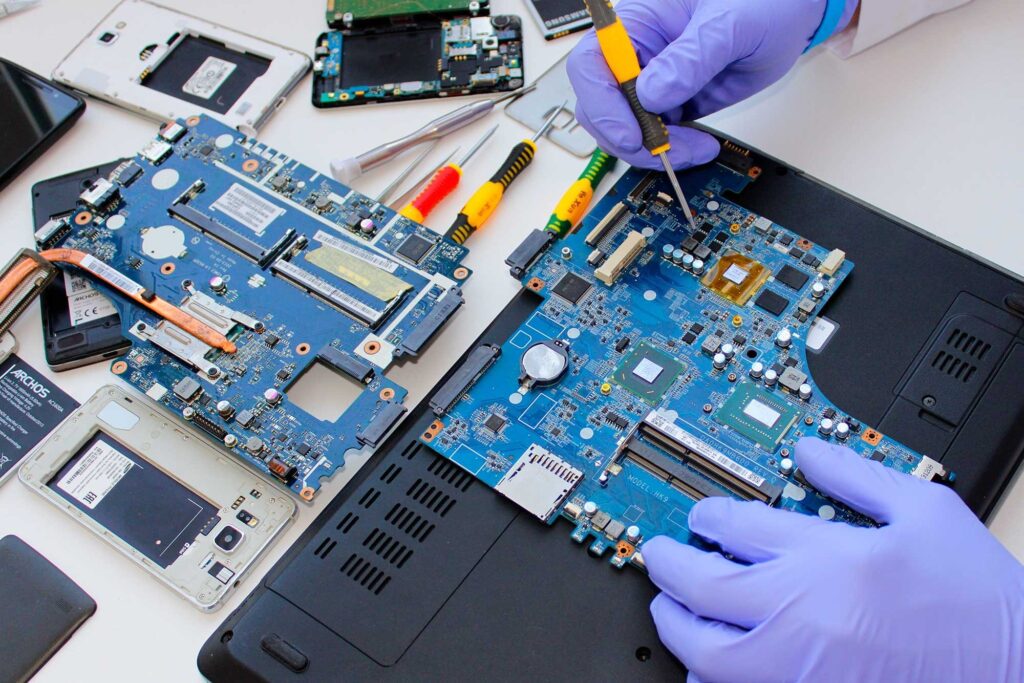
Motherboard repair is the process of diagnosing and correcting faults affecting a computer’s main circuit board. Depending on the device and the nature of the failure, this can involve replacing a damaged connector, repairing a power circuit, correcting a short circuit, replacing a failed electronic component, restoring firmware, repairing damaged traces, or replacing the entire motherboard.
The phrase “motherboard repair” therefore covers several levels of work. At the simplest level, a technician may identify a defective component that can be replaced without extensive board-level work. At the most advanced level, the technician may need to trace electrical signals across multiple circuits and replace tiny surface-mounted components.
I believe this distinction is important because the word “repair” can mean very different things in different shops. One repair provider may offer only complete board replacement, while another may attempt component-level repair. Neither approach is automatically wrong. The appropriate choice depends on the device, fault, availability of parts, cost, and technical feasibility.
A motherboard is also not an isolated component. It interacts with the power supply, CPU, RAM, storage, display system, cooling hardware, firmware, and external devices. This means a symptom appearing to originate from the motherboard can sometimes be caused elsewhere.
For example, suppose a desktop computer turns on but produces no display. A person might immediately conclude that the motherboard has failed. In reality, the problem could involve RAM, a graphics card, a display cable, an incorrect video output, firmware settings, or another hardware component. Dell’s troubleshooting resources similarly distinguish different no-video and startup conditions rather than treating every failure as a motherboard fault.
Why Motherboards Fail
Motherboards can fail for many reasons, and I would avoid assuming that one particular cause explains every failure. Some failures develop gradually, while others occur immediately after an electrical event, liquid spill, physical impact, or component installation.
Electrical Surges and Power Problems
Unstable electrical conditions can damage sensitive electronic components. A power supply that is malfunctioning or delivering abnormal voltage can also create problems for the motherboard and other components.
The exact effect depends on the design of the computer and the component affected. A power-related failure may damage voltage-regulation circuitry, protection components, connectors, or other sections of the board.
I believe this is one reason a technician should not simply install another motherboard without checking the surrounding hardware. If an external component contributed to the original failure, replacing the motherboard alone may not address the underlying problem.
Excessive Heat
Heat is another important factor. Modern processors and other components generate substantial heat, and the motherboard contains circuits that must operate within their designed thermal conditions.
Dust buildup, restricted airflow, a malfunctioning fan, poor cooling, or inadequate thermal management can contribute to excessive temperatures. Over time, repeated thermal stress can affect electronic components and soldered connections.
A computer that repeatedly shuts down under heavy workloads deserves attention even if it eventually starts again. Intermittent behavior can provide valuable diagnostic clues. Dell notes that BIOS event logs can help identify intermittent problems and can, for example, record thermal events associated with unexpected shutdowns.
Liquid Damage
Liquid is particularly dangerous because it can create electrical shorts and corrosion. Even if a device appears to work immediately after exposure, contamination can continue affecting the board.
I recommend treating liquid exposure as a serious hardware event rather than assuming that drying the exterior solves the problem. The appropriate response depends on the liquid, the amount involved, where it reached, and whether power was present when the incident occurred.
Physical Damage
A motherboard can also suffer physical damage from impact, incorrect installation, excessive force, broken connectors, or damaged mounting points.
A bent board, cracked circuit area, damaged socket, or broken port can require considerably more work than a simple software fix. In some cases, the board can be repaired; in others, replacement is more practical.
Component Aging
Electronic components can eventually fail because of age, operating conditions, manufacturing differences, or accumulated electrical and thermal stress. Older systems may also become difficult to repair because compatible replacement components are harder to source.
This is where I believe economic analysis matters. A technically possible repair is not automatically a sensible repair if the device is already near the end of its useful life.
Common Symptoms That May Point to a Motherboard Problem
The symptoms below can justify motherboard-focused troubleshooting, but none of them should be treated as automatic proof of motherboard failure.
| Symptom | Possible motherboard-related cause | Other possible causes | Initial diagnostic direction |
|---|---|---|---|
| No power | Power circuit, board short, failed controller | Power supply, battery, power button | Check power source and basic hardware first |
| Power but no display | Firmware, board circuitry, memory interface | RAM, GPU, display cable | Test display path and memory |
| Random shutdowns | Power regulation or thermal issue | CPU temperature, PSU, software | Check temperatures and event information |
| USB ports fail | Damaged port or board circuitry | Driver or peripheral issue | Test multiple ports and devices |
| Charging failure | Charging circuit or connector | Charger, cable, battery | Test known-good external components |
| Repeated boot failure | Firmware or board fault | Storage, RAM, OS | Separate POST failure from operating-system failure |
| Burning smell | Burned electronic component | PSU or peripheral failure | Stop using the device and seek professional diagnosis |
| Intermittent operation | Solder, power, thermal, or connection problem | RAM, cable, peripheral | Reproduce symptoms and document conditions |
The most important takeaway from this comparison is that symptoms overlap. A no-power condition does not prove that the motherboard is defective, and a successful power-on does not prove that the motherboard is healthy.
How I Approach Motherboard Diagnosis
I consider diagnosis the most important stage of motherboard repair because an incorrect diagnosis can lead to unnecessary expense.
Start With the Simplest Possibilities
I would first establish exactly what the computer does when power is applied. Does nothing happen? Do fans spin? Are indicator lights visible Does it reach the manufacturer’s logo? Does it enter the operating system and then fail?
These observations divide a complicated problem into smaller possibilities.
For example, a computer that shows a manufacturer’s logo but cannot load the operating system is fundamentally different from a computer that never reaches the initial hardware checks.
Remove Unnecessary Variables
A technician may test the system with only essential components connected. The exact procedure depends on the computer design, but the principle is straightforward: fewer variables can make troubleshooting easier.
If a system behaves differently after an external device, expansion card, memory module, or storage device is disconnected, that observation can narrow the investigation.
Check Manufacturer Diagnostics
Whenever the manufacturer provides built-in diagnostics, I believe those tools should be considered before more invasive work.
Some computers have diagnostic LEDs, beep patterns, firmware diagnostics, or built-in hardware tests. Dell, for example, provides preboot diagnostic resources and M-BIST capabilities on certain systems.
These tools are not universal, and a diagnostic result should be interpreted according to the exact model.
Separate Hardware and Software Problems
A computer that reaches BIOS or UEFI but fails when loading the operating system may not have a motherboard problem at all.
We can think of the startup process in stages. First, the system receives power. Then hardware initializes. Firmware performs initial checks and prepares the system. Only afterward does the operating system begin loading.
If a machine reaches firmware successfully, that fact can change the direction of troubleshooting.
Inspect the Board Carefully
A technician may inspect the motherboard for visible damage, corrosion, contamination, broken connectors, damaged components, burn marks, or other abnormalities.
However, visual inspection alone is not enough. Many electrical faults are invisible.
That is why board-level diagnosis may require measurements, schematics or board documentation where available, a multimeter, laboratory power equipment, microscopes, thermal tools, or specialized diagnostic equipment.
Motherboard Repair Methods
Motherboard repair is not one single technique. The method depends on the component and failure.
Connector Repair
Broken USB, HDMI, charging, audio, power, or other connectors may sometimes be replaced rather than replacing the complete board.
This can be an attractive repair when the underlying board circuitry remains functional and compatible replacement parts are available.
Component Replacement
A technician may replace failed resistors, capacitors, diodes, MOSFETs, integrated circuits, or other components where the fault can be identified and the component is serviceable.
The difficulty varies considerably. Some components are relatively accessible, while others are extremely small or located in complex circuits.
Trace Repair
Printed circuit boards contain conductive pathways that carry electrical signals and power. Physical damage can sometimes interrupt these pathways.
A skilled technician may repair certain damaged traces using specialized methods. The feasibility depends on the location, number of damaged layers, electrical requirements, and surrounding construction.
BIOS or Firmware Recovery
Some startup problems involve firmware rather than physical damage.
Firmware-related troubleshooting must be approached carefully because an incorrect firmware procedure can create additional problems. Model-specific instructions are important.
Dell’s support documentation also highlights that motherboard replacement can affect firmware settings and system configuration, demonstrating why board replacement is not always as simple as physically installing another board.
Power-Circuit Repair
Power-related motherboard faults can be among the more complicated repairs because the technician must determine where power is missing or abnormal.
A board may contain several power-management stages, and a failure in one area can prevent the system from starting.
I would not recommend inexperienced users attempting live board measurements without appropriate training and equipment. The possibility of short circuits, component damage, burns, or electrical injury makes this an area where professional repair is often appropriate.
Practical Motherboard Repair Scenarios
Let us consider a few hypothetical scenarios to understand how diagnosis changes the repair decision.
Scenario 1: Desktop With No Power
Imagine a desktop that suddenly becomes completely unresponsive. There are no fans, lights, or other obvious signs of activity.
It would be premature to order a new motherboard. The diagnostic process should first consider the wall outlet, power cable, power supply, switch connections, and other basic possibilities.
If the power supply is confirmed functional and the board still shows no appropriate response, motherboard-related investigation becomes more reasonable.
Scenario 2: Laptop That Charges but Does Not Start
Suppose a laptop’s charging indicator works, but pressing the power button produces no normal startup.
The battery, charger, charging circuitry, power button, embedded controller, and motherboard power rails could all be relevant.
A technician would ideally determine whether the board is receiving the required power signals and whether the startup sequence progresses.
Scenario 3: Computer Starts but USB Ports Do Not Work
If every USB port suddenly stops functioning, motherboard circuitry becomes one possibility. However, software configuration, drivers, firmware, or a problem with the attached device should also be considered.
If only one physically damaged port fails while others work normally, connector damage becomes a more obvious possibility.
Scenario 4: Liquid Spilled on a Laptop
Consider a hypothetical situation where liquid reaches a laptop keyboard and the computer immediately shuts down.
I would not recommend repeatedly attempting to power the device simply to see whether it works. Repeated power attempts can complicate an already serious electrical problem.
The correct response depends on the circumstances, but professional inspection is particularly important after significant liquid exposure.
When Motherboard Repair Is Better Than Replacement
The decision between repair and replacement should be based on more than the repair price.
I consider at least five factors: the value of the computer, the cost of the repair, the availability of replacement boards, the importance of the data, and the expected remaining useful life of the device.
A component-level repair may make sense when the computer is otherwise in good condition and the failed component is identifiable and replaceable.
Replacement may make more sense when the board has extensive damage, compatible parts are unavailable, repair labor is unusually high, or the entire system is already outdated.
The table below summarizes the decision factors I would use.
| Situation | Repair may make sense when | Replacement may make sense when |
| Older computer | Repair is inexpensive and the system still meets needs | Repair approaches the value of the machine |
| Newer computer | A specific component or connector has failed | Board damage is extensive |
| Liquid damage | Damage is localized and repairable | Multiple board areas are severely affected |
| Power failure | Fault can be isolated to a replaceable component | Damage extends across major circuits |
| Broken port | Connector can be replaced | Board layers or surrounding circuitry are badly damaged |
| Firmware issue | Recovery procedure is available | Firmware hardware is physically damaged |
| Rare motherboard | Repair preserves a difficult-to-source board | Replacement is available at a reasonable cost |
| Data-critical device | Repair can preserve the existing system | Replacement would require a complicated data recovery process |
The central lesson is that the cheapest immediate option is not always the best long-term option. I believe a good repair decision considers both technical feasibility and practical value.
Step-by-Step Motherboard Repair Process
Step 1: Record the Symptoms
Before opening the device, I would document exactly what happens.
Record whether the machine powers on, produces lights or sounds, displays error messages, reaches BIOS or UEFI, shuts down unexpectedly, or behaves differently with accessories connected.
Step 2: Confirm the Model
Motherboards vary significantly even within the same manufacturer.
The exact model number helps identify the correct documentation, compatible components, diagnostic procedures, and replacement options.
Step 3: Check Warranty and Service Status
Before attempting invasive work, check whether the computer is covered by a warranty or service agreement.
Opening a device or performing unauthorized modifications can have consequences depending on the manufacturer’s terms and local consumer protections.
Step 4: Back Up Data When Possible
If the computer still operates, I recommend backing up important files before undertaking repair work.
A motherboard repair should not be treated as a substitute for a proper backup strategy. Hardware can fail unexpectedly, and repair work always carries some risk.
Step 5: Perform Non-Invasive Diagnostics
Use manufacturer diagnostics and basic checks before board-level intervention.
This can prevent unnecessary disassembly and help distinguish a motherboard fault from a peripheral or software problem.
Step 6: Inspect the Hardware
Once appropriate, a technician can inspect connectors, cables, cooling systems, visible components, and the board itself.
The inspection should be methodical rather than based on assumptions.
Step 7: Isolate the Fault
The technician should determine which circuit or component is actually responsible.
This is the point at which specialized measurement equipment may become necessary.
Step 8: Decide Between Component Repair and Board Replacement
Once the fault is known, compare the repair cost and expected outcome with the price and availability of a replacement motherboard.
Step 9: Test the Repaired System
A repair should not be considered complete merely because the computer turns on.
Relevant functions should be tested, including startup, charging where applicable, memory detection, storage, USB ports, display output, networking, audio, thermal behavior, and other affected functions.
Step 10: Document the Repair
I consider documentation useful because it establishes what was diagnosed, what was replaced, and what limitations remain.
A transparent repair record also helps if the same fault returns.
Tools Used in Motherboard Repair
Different repair levels require different tools.
A basic troubleshooting process may require little more than the manufacturer’s diagnostic software and appropriate hand tools. Board-level repair can require substantially more.
Common equipment can include a digital multimeter, regulated laboratory power supply, microscope, soldering equipment, hot-air rework equipment, thermal inspection tools, electronic test equipment, and model-specific documentation.
I would strongly distinguish between owning a tool and knowing how to use it. A multimeter, for example, can provide useful information, but measuring the wrong point or accidentally creating a short can cause additional damage.
For professional board repair, the combination of technical knowledge, documentation, measurement technique, and component-level experience is more important than simply having expensive equipment.
Common Motherboard Repair Mistakes
Assuming Every Startup Failure Is a Motherboard Failure
This is probably the most common conceptual mistake.
Memory, power supplies, graphics hardware, storage, cables, batteries, displays, and peripherals can all create symptoms that resemble motherboard problems.
Replacing Parts Without Diagnosis
Random parts replacement can become expensive quickly.
A better approach is to establish a fault hypothesis, perform a test, evaluate the result, and then continue narrowing the possibilities.
Ignoring the Original Cause
If a motherboard failed after an electrical event, replacing the board without examining the power environment may leave the system vulnerable to another failure.
Using Excessive Heat
Improper soldering or rework temperatures can damage circuit boards, connectors, nearby components, or board layers.
Working Without ESD Precautions
Electrostatic discharge can damage sensitive electronic components. Appropriate ESD procedures are therefore an important part of professional electronics handling.
Forgetting Data and Configuration Issues
Motherboard replacement can affect firmware configuration, security features, activation, and other system-specific settings. Dell’s documentation, for example, describes situations in which motherboard replacement can lead to firmware, BIOS, or BitLocker-related considerations.
Giving a Repair Price Before Diagnosing the Fault
I believe this is especially important for consumers. A responsible estimate should identify whether the price is for diagnosis, a specific component repair, a replacement board, or an uncertain initial assessment.
How to Choose a Motherboard Repair Provider
When selecting a repair provider, I would look beyond advertising claims.
First, ask whether the provider performs component-level motherboard repair or simply replaces complete boards.
Second, ask whether diagnosis is charged separately and whether that fee is applied toward the repair.
Third, ask what happens if the board cannot be repaired.
Fourth, request information about warranty coverage on the repair.
Finally, ask whether the provider will return removed components or provide a clear description of what was replaced.
A useful repair provider should be willing to explain the diagnosis in understandable language. You do not necessarily need a lengthy technical lecture, but you should understand what failed and what work is being proposed.
The European Union’s developing right-to-repair framework also demonstrates the broader importance of repair transparency. The European Commission states that its 2026 measures are intended to make repair easier and more attractive and include requirements concerning repair services and spare parts for covered products.
That policy does not mean every motherboard is legally required to be repaired everywhere. Its scope depends on applicable legislation and product categories. I mention it because it illustrates a broader movement toward longer product lifecycles and more accessible repair.
What a Good Repair Estimate Should Include
Before approving work, I recommend asking for a written or clearly communicated estimate.
The estimate should ideally distinguish:
| Estimate Item | What I Would Want to Know |
| Diagnosis | Whether the diagnostic fee is separate |
| Labor | What type of repair work is included |
| Parts | Which component or board will be used |
| Repair method | Component-level repair or complete replacement |
| Warranty | How long the repair is covered |
| Data handling | Whether storage and data are affected |
| Testing | What functions will be checked after repair |
| Failure contingency | What happens if repair is unsuccessful |
| Turnaround | Estimated completion time |
| Additional charges | Circumstances that could change the estimate |
This table matters because a low advertised price can be misleading if it covers only inspection or excludes necessary parts and labor.
I believe consumers should compare the total expected cost rather than a headline price.
Verified Perspectives on Repair
The broader value of repair is not limited to individual computers. It also connects to sustainability, product longevity, and resource use.
iFixit has described its philosophy in unusually direct language:
“Repair isn’t just about fixing broken stuff.”
iFixit, “Our Desire for New Is Killing the Planet—and Us.”
I find this quotation relevant because motherboard repair illustrates the difference between replacing an entire product and correcting a specific failure. When repair is technically and economically practical, extending the useful life of a computer can avoid the need to replace the complete device.
European policymakers have expressed a similar perspective when discussing repairability. During the development of the EU right-to-repair framework, Alexia Bertrand emphasized that repair can extend product life while supporting jobs and reducing waste.
“Europe makes a clear choice for repair instead of disposal.”
Alexia Bertrand, Belgian State Secretary for the Budget and Consumer Protection, Council of the European Union.
The statement matters to me because it places repair in a broader economic context. A motherboard problem is a technical issue for an individual computer, but repairability also influences how long electronic products remain useful.
A third useful perspective comes from the European Commission’s discussion of consumer repair rights. The Commission explained that its approach was intended to give consumers practical tools for choosing repair rather than automatically replacing products.
“We want to help consumers to repair their products, if they wish to do so.”
Věra Jourová, Vice-President for Values and Transparency, European Commission.
From my perspective, the practical lesson is not that every motherboard should be repaired. Rather, consumers should have enough information to make an informed decision when repair is technically possible.
How to Prevent Motherboard Problems
Prevention begins with the environment in which a computer operates.
Keep ventilation openings clear and avoid placing laptops or desktops where airflow is restricted. Dust should be addressed according to the manufacturer’s cleaning guidance.
Protect the computer from liquid exposure. A drink next to a laptop can become a serious repair problem in seconds.
Use appropriate electrical protection where relevant. A quality power setup can reduce some risks, although no protective device can guarantee that electronic hardware will never fail.
Handle internal components carefully. When installing memory, storage, graphics cards, or other hardware, use the correct procedures and avoid unnecessary force.
Keep important data backed up separately. Even excellent hardware maintenance cannot eliminate the possibility of sudden failure.
Finally, pay attention to early warning signs. Repeated shutdowns, unusual charging behavior, intermittent ports, unexplained freezes, or unusual electrical smells should not automatically be ignored.
When DIY Motherboard Repair Makes Sense
I think DIY troubleshooting can be appropriate when the task is low-risk and well documented.
Examples include checking cables, reseating appropriate removable components, running manufacturer diagnostics, verifying external power, checking documented error codes, or replacing a clearly user-serviceable part according to manufacturer instructions.
Board-level soldering is different.
If the repair involves live measurements, tiny surface-mounted components, hot-air rework, firmware programming, or damaged multilayer traces, I would recommend appropriate professional training and equipment.
The cost of one damaged board can easily outweigh the savings from attempting an advanced repair without sufficient experience.
How Much Does Motherboard Repair Cost?
There is no universal motherboard repair price because the cost varies by country, device, model, fault, parts availability, technician skill, and repair method.
A broken connector can be fundamentally different from a damaged power-management circuit. A laptop motherboard can also be much more difficult to service than a modular desktop board.
For that reason, I would be cautious about websites that promise one fixed price for every motherboard problem.
A more useful approach is to separate costs into categories: diagnostic fee, labor, replacement components, complete replacement board, data-related work, and additional testing.
For an older computer, even a moderate repair cost may exceed the system’s practical value. For a newer or specialized computer, repairing the existing board may be economically attractive because the replacement motherboard is expensive or difficult to obtain.
How Long Does Motherboard Repair Take?
Repair time varies for the same reasons that repair prices vary.
A straightforward connector replacement may be relatively quick once the correct part is available. A difficult intermittent board fault can take substantially longer because the technician must reproduce the problem, identify the affected circuit, obtain documentation or parts, perform the repair, and test the system.
Parts availability can also determine the timeline.
I believe consumers should treat turnaround estimates as estimates rather than guarantees unless the repair provider has already diagnosed the fault and confirmed the required parts.
Motherboard Repair and Sustainability
I see motherboard repair as part of a larger question about how we use electronics.
Replacing a complete computer because of one failed board component can result in a useful collection of components being discarded or diverted into recycling streams. Repair does not eliminate electronic waste, but successful repair can extend the period during which an existing device remains useful.
The European Council explains that its right-to-repair measures are intended to encourage longer product lifetimes, reuse, and recycling while reducing waste and consumption of raw materials.
At the same time, I would not argue that repair is always environmentally or economically superior in every individual case. If a computer is extremely old, consumes significantly more energy than a suitable replacement, or requires extensive repair, replacement may be reasonable.
The important point is to evaluate the choice rather than automatically selecting replacement.
Questions to Ask Before Approving Motherboard Repair
Before authorizing a repair, I would ask:
- What exactly has been diagnosed?
- Is the problem definitely on the motherboard?
- Could another component be producing the same symptoms?
- Is this component-level repair or complete board replacement?
- Are compatible parts available?
- What is the total estimated cost?
- Is diagnosis included in the quoted amount?
- Is there a repair warranty?
- Will my data remain untouched?
- What happens if the board cannot be repaired?
- Will the repaired system receive a full functional test?
- Is replacement economically better for this particular computer?
These questions can prevent misunderstandings and make it easier to compare repair providers.
My Practical Recommendations for Motherboard Repair
From my perspective, the strongest motherboard repair strategy is based on diagnosis, transparency, and proportionality.
I would not begin by assuming that the motherboard is defective simply because the computer does not start. I would first establish the symptoms and eliminate obvious external causes.
If motherboard failure becomes likely, I would then determine whether the problem is physical, electrical, firmware-related, connector-related, or associated with another circuit.
For simple hardware faults, a qualified repair may be worthwhile. For advanced board-level problems, I would choose a technician with appropriate diagnostic and rework capabilities rather than relying solely on a general computer shop.
Cost should come after diagnosis. A repair quote without a clear understanding of the fault has limited value.
I also recommend considering the entire system. A repaired motherboard inside a computer with a failing battery, outdated storage, damaged display, or inadequate performance may not represent a sensible long-term investment.
Finally, I believe data protection should remain part of every repair decision. A functioning motherboard is valuable, but irreplaceable personal or business data can be even more important.
Conclusion
I believe the most important lesson about motherboard repair is that diagnosis should come before replacement. A computer that refuses to start, loses display output, shuts down unexpectedly, or develops charging and connectivity problems may have a motherboard fault, but those symptoms can also originate elsewhere.
From my perspective, the best approach is to identify the exact symptoms, confirm the computer model, use available manufacturer diagnostics, isolate the failing component or circuit, and then compare component-level repair with complete motherboard replacement. We can reasonably conclude that the right choice depends on technical feasibility, cost, parts availability, system age, and the value of the device.
I also believe consumers should ask clear questions before approving repair work. A trustworthy provider should explain what was diagnosed, what will be repaired or replaced, how much the work is expected to cost, and what warranty applies.
My practical recommendation is simple: do not assume that a dead computer needs a new motherboard. Start with a structured diagnosis, protect your data, and choose repair or replacement only after the actual problem and total cost are understood.
Frequently Asked Questions
What Is Motherboard Repair?
Motherboard repair is the process of diagnosing and correcting faults on a computer’s main circuit board. Depending on the problem, it may involve replacing connectors, repairing damaged traces, replacing electronic components, correcting power circuitry, recovering firmware, or replacing the entire board. I recommend confirming the actual cause before deciding on a repair because similar symptoms can originate from memory, power supplies, storage, displays, batteries, or other components.
How Do I Know If My Motherboard Is Failing?
Possible signs include no power, no display, repeated startup failure, unexpected shutdowns, malfunctioning ports, charging problems, unusual electrical smells, or intermittent operation. However, none of these symptoms proves motherboard failure by itself. A proper diagnosis should separate motherboard faults from problems involving RAM, power supplies, batteries, graphics hardware, storage, cables, or software.
Can a Damaged Motherboard Be Repaired?
Yes, some damaged motherboards can be repaired, but repairability depends on the type and location of the damage. A damaged connector or replaceable component may be repairable, while extensive multilayer board damage may make replacement more practical. In my view, the decision should be based on diagnosis, parts availability, technician capability, repair cost, and the value of the computer.
Is Motherboard Repair Better Than Replacement?
Motherboard repair can be better when the fault is localized and the computer is otherwise in good condition. Replacement can be preferable when the board is severely damaged, parts are unavailable, or the repair cost approaches the value of the entire computer. We should also consider the system’s age, performance, warranty status, and expected remaining useful life.
How Much Does Motherboard Repair Cost?
There is no single reliable price for motherboard repair because costs vary by device, country, fault, parts, labor, and repair method. A connector repair may have very different costs from a complex power-circuit repair or complete board replacement. I recommend requesting a diagnosis and total estimate before approving work rather than relying on a generic advertised price.
Can I Repair a Motherboard Myself?
Basic troubleshooting may be suitable for an experienced user, particularly when manufacturer instructions cover the procedure. Advanced motherboard repair is different because it can involve soldering, microscopic components, firmware programming, live electrical measurements, and specialized equipment. I would avoid board-level work without appropriate knowledge and safety practices because an incorrect procedure can cause additional damage.
How Long Does Motherboard Repair Take?
The timeframe depends on the diagnosis, availability of parts, complexity of the board, and workload of the repair provider. Simple repairs may be completed relatively quickly once the necessary component is available, while intermittent or complex board faults can require substantially more diagnostic time. A repair provider can give a more meaningful estimate after identifying the actual fault.
Does Motherboard Replacement Affect Data?
Replacing a motherboard does not necessarily mean that stored data is automatically erased, because data is generally stored on separate storage hardware. However, motherboard replacement can affect firmware configuration, security features, encryption-related settings, activation, and system compatibility. Dell documents situations involving BitLocker recovery prompts and firmware considerations after motherboard replacement.
Should I Repair an Old Computer or Buy a New One?
I would compare the repair cost with the computer’s current value, performance, condition, and expected remaining life. If a relatively inexpensive motherboard repair restores a computer that still meets your needs, repair may be sensible. If the system has several aging components and the repair is expensive, replacement may provide better long-term value.
Sources and References
- Dell Support, information on M-BIST motherboard diagnostics and no-power/no-video conditions.
- Dell Support, hardware diagnostics, motherboard questions, startup troubleshooting, and related support resources.
- Dell Support, BIOS event logs and diagnostic logging for troubleshooting intermittent problems.
- Dell documentation on motherboard replacement, firmware, configuration, and system information.
- European Commission, 2026 information on new consumer rights for repair.
- Council of the European Union, right-to-repair policy and repairability measures.
- European Commission, statements and background on the right to repair.
- iFixit, discussion of repair, product longevity, and electronic waste.
Disclaimer
This article provides general educational information about motherboard repair and computer hardware troubleshooting. It is not a substitute for model-specific manufacturer instructions or professional technical diagnosis. Electrical and board-level repair can involve risks of component damage, electrical injury, data loss, or further hardware failure. Prices, repair times, warranty conditions, available parts, and legal consumer rights vary by country, manufacturer, device, and individual circumstances. Always verify applicable instructions and service terms before opening or modifying a computer.